Reverse Engineering a Router Memory Dump
2025 NSA Codebreaker Challenge Task 3 (Reverse Engineering): using Volatility on a Linux router memory dump and reversing its kernel to find the compromise.
Challenge
Task 3 - Digging deeper - (Reverse Engineering)
The network administrators confirm that the IP address you provided in your description is an edge router. DAFIN-SOC is asking you to dive deeper and reverse engineer this device. Fortunately, their team managed to pull a memory dump of the device.
Scour the device’s memory dump and identify anomalous or malicious activity to find out what’s going on.
Your submission will be a list of IPs and domains, one per line. For example:
127.0.0.1 localhost
192.168.54.131 corp.internal
...
Downloads:
- Memory Dump memory.dump.gz
- Metadata System.map.br
- Kernel Image vmlinux.xz
- Not provided here due to file size (73.3 MB), will be added another time
Action Items:
- Submit a complete list of affected IPs and FQDNs, one per line.
Alright Task 3 comes with 3 artifacts, how fitting.
Examination time:
memory.dump
$ file memory.dump.gz
memory.dump.gz: gzip compressed data, was ".tmp_lxqtm261", max compression, original size modulo 2^32 151193723

$ gunzip memory.dump.gz && ls -l
-rw-r--r--. 1 sean sean 151193723 Jul  8 13:55 memory.dump

$ file memory.dump
memory.dump: ELF 64-bit LSB core file, x86-64, version 1 (SYSV), SVR4-style
System.map.br
$ file System.map.br
System.map.br: data

$ brotli -d -k System.map.br && ls -lh
-rw-r--r--. 1 sean sean 4.7M Jul  8 21:59 System.map
-rw-r--r--. 1 sean sean 666K Jul  8 21:59 System.map.br

$ file System.map
System.map: ASCII text
vmlinux
$ file vmlinux.xz
vmlinux.xz: XZ compressed data, checksum CRC64

$ xz -d vmlinux.xz && ls -l
-rw-r--r--. 1 sean sean 343358008 Jul  8 21:52 vmlinux

$ file vmlinux
vmlinux: ELF 64-bit LSB executable, x86-64, version 1 (SYSV), statically linked, BuildID[sha1]=0a232bb27aa61adfd29ae5642510ea0c59059174, with debug_info, not stripped
Already, I see a few things worth noting:
with debug_info, not strippedon VMLinux, this means that it is possible to sift through this file, as all internal symbols are present.bris showing up as “data” but after Google-ing that extension, it’s a Brotli-compressed file. Post-decompression, it’s still ASCII text, but readable now.- Brotli did some serious compression on the System.map file
Let’s see what OS we’re working with specifically
$ strings vmlinux | grep -E "*Linux version*"
Linux version 5.15.134 (dsu@Ubuntu) (x86_64-openwrt-linux-musl-gcc (OpenWrt GCC 12.3.0 r23497-6637af95aa) 12.3.0, GNU ld (GNU Binutils) 2.40.0) #0 SMP Mon Oct 9 21:45:35 2023
So it’s OpenWrt, a custom firmware for routers.
Now it’s time for some research.
20 minutes later
I came up with a few ways to look into this. There’s a tool called Volatility, a memory forensics tool, which is designed to dig through exactly these kinds of files.
And it has a companion binary called dwarf2json to help us by processing files containing symbol and type information.
Time to figure out how to use dwarf2json, since that’s a prerequisite here.
$ ./dwarf2json-linux-amd64 --help
Usage: ./dwarf2json-linux-amd64 COMMAND

A tool for generating intermediate symbol file (ISF)

Commands:
  linux  generate ISF for Linux analysis
  mac    generate ISF for macOS analysis

Options:
  -h, --help     Show this screen.
  -v, --version  Show tool and output schema version.
Trying the linux option:
$ ./dwarf2json-linux-amd64 linux
No files specified
Usage: dwarf2json linux [OPTIONS]

      --elf PATH           ELF file PATH to extract symbol and type information
      --elf-symbols PATH   ELF file PATH to extract only symbol information
      --elf-types PATH     ELF file PATH to extract only type information
      --system-map PATH    System.Map file PATH to extract symbol information
Well that seems extremely straightforward! I was able to immediately build the command:
$ ./dwarf2json-linux-amd64 linux --elf vmlinux --system-map System.map > output.json
It took a solid minute but it worked. I now have a JSON profile for Volatility. From their GitHub, I see this:
Symbol tables zip files must be placed, as named, into the volatility3/symbols directory (or just the symbols directory next to the executable file).
Since I installed Volatility via UV and pip, it’s time for a find command to see where to put this.
Once I moved it, I had to verify:
$ vol isfinfo
Volatility 3 Framework 2.28.0
Progress:  100.00               PDB scanning finished
URI     Valid   Number of base_types    Number of types Number of symbols       Number of enums Identifying information

jar:file:/home/sean/Desktop/Task3/.venv/lib/python3.14/site-packages/volatility3/symbols/linux.zip!linux/Debian_3.2.57-3+deb7u2_3.2.0-4-amd64_x64.json.xz       Unknown 15      4118    65853   553b'Linux version 3.2.0-4-amd64 (debian-kernel@lists.debian.org) (gcc version 4.6.3 (Debian 4.6.3-14) ) #1 SMP Debian 3.2.57-3+deb7u2\n\x00'
jar:file:/home/sean/Desktop/Task3/.venv/lib/python3.14/site-packages/volatility3/symbols/linux.zip!linux/Centos_2.6.18-8.1.15.el5_2.6.18-8.1.15.el5_x64.json.xz Unknown 13      417     27928   6  b'Linux version 2.6.18-8.1.15.el5 (mockbuild@builder6.centos.org) (gcc version 4.1.1 20070105 (Red Hat 4.1.1-52)) #1 SMP Mon Oct 22 08:32:28 EDT 2007\n'
jar:file:/home/sean/Desktop/Task3/.venv/lib/python3.14/site-packages/volatility3/symbols/linux.zip!linux/Debian_4.9.30-2+deb9u2_4.9.0-3-amd64_x64.json.xz       Unknown 17      6209    98393   923b'Linux version 4.9.0-3-amd64 (debian-kernel@lists.debian.org) (gcc version 6.3.0 20170516 (Debian 6.3.0-18) ) #1 SMP Debian 4.9.30-2+deb9u2 (2017-06-26)\n\x00'
jar:file:/home/sean/Desktop/Task3/.venv/lib/python3.14/site-packages/volatility3/symbols/linux.zip!linux/Debian_2.6.32-48squeeze6_2.6.32-5-amd64_x64.json.xz    Unknown 16      3379    53886   388b'Linux version 2.6.32-5-amd64 (Debian 2.6.32-48squeeze6) (jmm@debian.org) (gcc version 4.3.5 (Debian 4.3.5-4) ) #1 SMP Tue May 13 16:34:35 UTC 2014\n\x00'
file:///home/sean/Desktop/Task3/.venv/lib/python3.14/site-packages/volatility3/framework/symbols/output.json    Unknown 18      10897   147490  1756    b'Linux version 5.15.134 (dsu@Ubuntu) (x86_64-openwrt-linux-musl-gcc (OpenWrt GCC 12.3.0 r23497-6637af95aa) 12.3.0, GNU ld (GNU Binutils) 2.40.0) #0 SMP Mon Oct 9 21:45:35 2023\n\x00'
Looks like it all worked out? That last line is exactly what I generated.
So what we’ve done now is import the OpenWrt profile into Volatility, meaning the program can now read this memory dump just like it already reads certain other operating systems’ dumps. You can see that Debian and Red Hat are already pre-configured profiles in there. Now mine is too!
$ vol -f memory.dump
Volatility 3 Framework 2.28.0
usage: vol [-h] [-c CONFIG] [--parallelism [{processes,threads,off}]] [-e EXTEND] [-p PLUGIN_DIRS] [-s SYMBOL_DIRS] [-v] [-l LOG] [-o OUTPUT_DIR] [-q] [-f FILE] [--write-config]
           [--save-config SAVE_CONFIG] [--clear-cache] [--cache-path CACHE_PATH] [--offline | -u URL] [--filters FILTERS] [--hide-columns [HIDE_COLUMNS ...]] [-r RENDERER]
           [--single-location SINGLE_LOCATION] [--stackers [STACKERS ...]] [--single-swap-locations [SINGLE_SWAP_LOCATIONS ...]]
           PLUGIN ...
vol: error: Please select a plugin to run (see 'vol --help' for options
…that would be too easy if it worked. Time for more research.
Research done. One plugin it seems like I can use is the pstree plugin, used to see the active process table from when the memory dump was taken. The plugin generates a ton of lines, so I’m gonna truncate it here.
$ vol -f memory.dump linux.pstree
Volatility 3 Framework 2.28.0
Progress:  100.00               Stacking attempts finished
OFFSET (V)      PID     TID     PPID    COMM

0x88800329cb40  1       1       0       procd
* 0x88800534da40        514     514     1       ubusd
* 0x88800534bc40        515     515     1       ash
** 0x888003edad40       1552    1552    515     4
*** 0x88800631e940      1854    1854    1552    service
**** 0x88800631bc40     1855    1855    1854    dnsmasq
***** 0x8880067fda40    1872    1872    1855    readlink
* 0x888005349e40        516     516     1       askfirst
* 0x888003edbc40        551     551     1       urngd
* 0x88800631da40        1018    1018    1       logd
* 0x8880067f9e40        1168    1168    1       dnsmasq
** 0x8880067f8040       1174    1174    1168    dnsmasq
* 0x8880063c1e40        1244    1244    1       dropbear
* 0x888003f20040        1405    1405    1       netifd
* 0x88800631ad40        1524    1524    1       odhcpd
* 0x8880067f8f40        1744    1744    1       ntpd
** 0x8880057acb40       1749    1749    1744    ntpd
Ok. Hold on. We’re deep enough into this investigation that it’s possible to lose track. Right now, we’ve successfully broken into the memory dump and are at a point where we can poke around in a live “frozen” Linux instance. Our goal is to investigate why the router was serving that bogus IP address instead of Ubuntu’s actual IP address. Sounds like a DNS problem to me. (It’s always DNS, isn’t it?).
Let’s investigate any DNS processes. I already see dnsmasq was running in that previous excerpt above, but let’s look for the other major
Linux DNS service: the one provided by systemd.
$ vol -f memory.dump linux.pstree | grep systemd-resolved
Nothing. So this router was running dnsmasq. Also, notice those asterisks:
* 0x88800534bc40        515     515     1       ash
** 0x888003edad40       1552    1552    515     4
*** 0x88800631e940      1854    1854    1552    service
**** 0x88800631bc40     1855    1855    1854    dnsmasq
***** 0x8880067fda40    1872    1872    1855    readlink
This means dnsmasq is a subprocess spawned from ash --> 4 --> service --> dnsmasq.
Ash sounds like it’s a shell, akin to bash or zsh. From Wikipedia:
A lightweight (92K) Bourne compatible shell. Great for machines with low memory, but does not provide all the extras of shells like bash, tcsh, and zsh. Runs most shell scripts compatible with the Bourne shell. Note that under Linux, most scripts seem to use at least some bash-specific syntax. The Slackware setup scripts are a notable exception, since ash is the shell used on the install disks. NetBSD uses ash as its /bin/sh.
Ash (mainly the Dash fork) is also fairly popular in embedded Linux systems. Dash version 0.3.8-5 was incorporated into BusyBox, the catch-all executable often employed in this area. Modern BusyBox versions support additional Bash features which are enabled in modern distributions like Alpine Linux, Tiny Core Linux and Linux-based router firmware such as OpenWrt, Tomato and DD-WRT.
Yeah this is definitely a shell. The 4 with a PID of 1552 is interesting though. Volatility can help us trace that. Spending more time on the
docs page led me to discover the linux.proc plugin. Examining it:
$ vol -f memory.dump linux.proc --help
usage: vol linux.proc.Maps [-h] [--pid [PID ...]] [--dump] [--address [ADDRESS ...]] [--maxsize MAXSIZE]

Lists all memory maps for all processes.

options:
  -h, --help            show this help message and exit
  --pid [PID ...]       Filter on specific process IDs
  --dump                Extract listed memory segments
  --address [ADDRESS ...]
                        Process virtual memory addresses to include (all other VMA sections are excluded). This can be any virtual address within the VMA section.
  --maxsize MAXSIZE     Maximum size for dumped VMA sections (all the bigger sections will be ignored)
Off topic but this help is so useful.
$ vol -f memory.dump linux.proc --dump --pid 1552
Volatility 3 Framework 2.28.0
Progress:  100.00               Stacking attempts finished
PID     Process Start   End     Flags   PgOff   Major   Minor   Inode   File Path       File output

1552    4       0x55f7b8238000  0x55f7b8239000  r--     0x0     0       1       1024    /memfd:x (deleted)      pid.1552.vma.0x55f7b8238000-0x55f7b8239000.dmp
1552    4       0x55f7b8239000  0x55f7b823a000  r-x     0x1000  0       1       1024    /memfd:x (deleted)      pid.1552.vma.0x55f7b8239000-0x55f7b823a000.dmp
1552    4       0x55f7b823a000  0x55f7b823b000  r--     0x2000  0       1       1024    /memfd:x (deleted)      pid.1552.vma.0x55f7b823a000-0x55f7b823b000.dmp
1552    4       0x55f7b823b000  0x55f7b823c000  r--     0x2000  0       1       1024    /memfd:x (deleted)      pid.1552.vma.0x55f7b823b000-0x55f7b823c000.dmp
1552    4       0x55f7b823c000  0x55f7b823d000  rw-     0x3000  0       1       1024    /memfd:x (deleted)      pid.1552.vma.0x55f7b823c000-0x55f7b823d000.dmp
1552    4       0x55f7b87b6000  0x55f7b87b7000  ---     0x0     0       0       0       Anonymous Mapping       pid.1552.vma.0x55f7b87b6000-0x55f7b87b7000.dmp
1552    4       0x55f7b87b7000  0x55f7b87b8000  rw-     0x0     0       0       0       Anonymous Mapping       pid.1552.vma.0x55f7b87b7000-0x55f7b87b8000.dmp
1552    4       0x7f6497dfc000  0x7f6497dfd000  rw-     0x0     0       0       0       Anonymous Mapping       pid.1552.vma.0x7f6497dfc000-0x7f6497dfd000.dmp
1552    4       0x7f6497dfd000  0x7f6497e11000  r--     0x0     254     0       361     /lib/libc.so    pid.1552.vma.0x7f6497dfd000-0x7f6497e11000.dmp
1552    4       0x7f6497e11000  0x7f6497e5d000  r-x     0x14000 254     0       361     /lib/libc.so    pid.1552.vma.0x7f6497e11000-0x7f6497e5d000.dmp
1552    4       0x7f6497e5d000  0x7f6497e72000  r--     0x60000 254     0       361     /lib/libc.so    pid.1552.vma.0x7f6497e5d000-0x7f6497e72000.dmp
1552    4       0x7f6497e72000  0x7f6497e73000  r--     0x74000 254     0       361     /lib/libc.so    pid.1552.vma.0x7f6497e72000-0x7f6497e73000.dmp
1552    4       0x7f6497e73000  0x7f6497e74000  rw-     0x75000 254     0       361     /lib/libc.so    pid.1552.vma.0x7f6497e73000-0x7f6497e74000.dmp
1552    4       0x7f6497e74000  0x7f6497e77000  rw-     0x0     0       0       0       Anonymous Mapping       pid.1552.vma.0x7f6497e74000-0x7f6497e77000.dmp
1552    4       0x7ffc29528000  0x7ffc29549000  rw-     0x0     0       0       0       [stack] pid.1552.vma.0x7ffc29528000-0x7ffc29549000.dmp
1552    4       0x7ffc2957d000  0x7ffc29581000  r--     0x0     0       0       0       Anonymous Mapping       pid.1552.vma.0x7ffc2957d000-0x7ffc29581000.dmp
1552    4       0x7ffc29581000  0x7ffc29582000  r-x     0x0     0       0       0       [vdso]  pid.1552.vma.0x7ffc29581000-0x7ffc29582000.dmp
Alright now what the hell do I do with this? You guessed it: more researching time.
Well that was a fast research session. That first line is highly interesting. Usually in low level contexts, fd refers to a file descriptor, or a
handle an operating system provides to a program to be able to read/write to files on disk. But a memfd is a file descriptor which doesn’t point to the disk,
but to a location within system memory. The man pages themselves say:
$ apropos memfd
memfd_create (2)     - create an anonymous file
memfd_secret (2)     - create an anonymous RAM-based file to access secret memory regions
man memfd_create :
memfd_create()creates an anonymous file and returns a file descriptor that refers to it. The file behaves like a regular file, and so can be modified, truncated, memory-mapped, and so on. However, unlike a regular file, it lives in RAM and has a volatile backing storage. Once all references to the file are dropped, it is automatically released.
But this wasn’t an ordinary file, it was a process! This program managed to spawn an executable into system memory, have that binary do its bidding, and then disappear without a trace. It spanned memory locations 0x55 F7 B8 23 80 00 to 0x55 F7 B8 23 D0 00 with a difference of 0x5000. That’s 20,480 bytes, or 20.48 kilobytes worth of code.
I wonder if its possible to reconstruct the file that was in memory?
Apparently Volatility is wizard-grade software which can somehow extract each one of those start/end blocks:
$ vol -f memory.dump -o reconstruction linux.proc.Maps --pid 1552 --dump
Let’s see what the reconstruction gave us:
$ ls -lh
total 672K
-rw-------. 1 sean sean 4.0K Jul  8 23:09 pid.1552.vma.0x55f7b8238000-0x55f7b8239000.dmp
-rw-------. 1 sean sean 4.0K Jul  8 23:09 pid.1552.vma.0x55f7b8239000-0x55f7b823a000.dmp
-rw-------. 1 sean sean 4.0K Jul  8 23:09 pid.1552.vma.0x55f7b823a000-0x55f7b823b000.dmp
-rw-------. 1 sean sean 4.0K Jul  8 23:09 pid.1552.vma.0x55f7b823b000-0x55f7b823c000.dmp
-rw-------. 1 sean sean 4.0K Jul  8 23:09 pid.1552.vma.0x55f7b823c000-0x55f7b823d000.dmp
-rw-------. 1 sean sean 4.0K Jul  8 23:09 pid.1552.vma.0x55f7b87b6000-0x55f7b87b7000.dmp
-rw-------. 1 sean sean 4.0K Jul  8 23:09 pid.1552.vma.0x55f7b87b7000-0x55f7b87b8000.dmp
-rw-------. 1 sean sean 4.0K Jul  8 23:09 pid.1552.vma.0x7f6497dfc000-0x7f6497dfd000.dmp
-rw-------. 1 sean sean  80K Jul  8 23:09 pid.1552.vma.0x7f6497dfd000-0x7f6497e11000.dmp
-rw-------. 1 sean sean 304K Jul  8 23:09 pid.1552.vma.0x7f6497e11000-0x7f6497e5d000.dmp
-rw-------. 1 sean sean  84K Jul  8 23:09 pid.1552.vma.0x7f6497e5d000-0x7f6497e72000.dmp
-rw-------. 1 sean sean 4.0K Jul  8 23:09 pid.1552.vma.0x7f6497e72000-0x7f6497e73000.dmp
-rw-------. 1 sean sean 4.0K Jul  8 23:09 pid.1552.vma.0x7f6497e73000-0x7f6497e74000.dmp
-rw-------. 1 sean sean  12K Jul  8 23:09 pid.1552.vma.0x7f6497e74000-0x7f6497e77000.dmp
-rw-------. 1 sean sean 132K Jul  8 23:09 pid.1552.vma.0x7ffc29528000-0x7ffc29549000.dmp
-rw-------. 1 sean sean  16K Jul  8 23:09 pid.1552.vma.0x7ffc2957d000-0x7ffc29581000.dmp
-rw-------. 1 sean sean 4.0K Jul  8 23:09 pid.1552.vma.0x7ffc29581000-0x7ffc29582000.dmp
As you can see by the file names, it ranges the entire memory range PID 1552, not just the memfd’s range.
WAIT. A. SECOND. I took a minute to pause here and look at what I was doing, trying to zoom out and gain a sense of the bigger picture.
And I just noticed something I missed earlier. There are 2 dnsmasq services running in that initial process table dump! One is
running under the ash parent process and the other is running normally under its own parent process. This might be the concrete proof
that I’m on the right track (and still sane).
Ok now back to the reconstruction. I wonder if there’s a way to put those back together. I know the memfd spans from 0x55f7b8238000 to 0x55f7b823d000.
Are these valid segments in the dump?
$ ls | grep "0x55f7b8238000"
pid.1552.vma.0x55f7b8238000-0x55f7b8239000.dmp
$ ls | grep "0x55f7b823d000"
pid.1552.vma.0x55f7b823c000-0x55f7b823d000.dmp
Oh yeah.
Ok I have a really bad idea: what if I just print them all and redirect them into a new file?
cat pid.1552.vma.0x55f7b8238000-0x55f7b8239000.dmp pid.1552.vma.0x55f7b8239000-0x55f7b823a000.dmp pid.1552.vma.0x55f7b823a000-0x55f7b823b000.dmp pid.1552.vma.0x55f7b823b000-0x55f7b823c000.dmp pid.1552.vma.0x55f7b823c000-0x55f7b823d000.dmp > funni.dump
POLYMARKET: Will this work?
Yes (1¢)
No (99¢)
$ file funni.dump
funni.dump: ELF 64-bit LSB pie executable, x86-64, version 1 (SYSV), dynamically linked, interpreter /lib/ld-musl-x86_64.so.1, missing section headers at 59168
Inchresting.
Time for one of my favourite commands: strings. I actually do enjoy using this to see what text is in a given binary.
$ strings funni.dump
There’s a bunch of normal Linux stuff in there like printf, glibc, malloc, etc.
But also this:
opening /etc/hosts
/etc/hosts
fopen /etc/hosts
%s %s
warning: weird token count (%zu); ignoring last... check this fff
Usage: %s <encoded file>
Decoded payload too short to even have the key...
service dnsmasq restart
;*3$"
?456789:;<=
 !"#$%&'()*+,-./0123
L0YZDjqu9KnLK9Uk2775nAtKz7YhW0A77o9kXYTj7+Nwr3JuDWseaJ5KoCtTQQnBqTdRqoFpBvmYEVTZ1MCQYKZNQzN8D45krqYyaDxft9sgX729VE2PCInY5fSH0mPBOb/eh4MS0AkVtZEtHLgt15d7a7n2A5ctakZoQeRDw59LBQ9Ku27Hy3gph5s58GduOWATuAS4V2hRLn7DRM6VZjfEjmpI/PtYApmaRZsFezZJL4QUsvDCz+LxDJ1pMcWmVS/MSYHI35RT9WOZEWAvWVSpYvbiqPJSQKrJZAvknwdx+Gi9ipGjc8Zzztfu6SUp+yS5hcbhVGLU4GVKEn6mDJ9guIKgwzvGOrig7b4pDdL/ck9WLP7AWSn96e+2KJUxmLeJtGjbE5JeKnZb1v9SZ/HUlI0J2gYO1tayliOENO7K0aB0CoT/PV/0l3QQvqI7Yy04wQbi6pjqhhirKpBcUkEOk+sBeJfpFgnxe/n6kt+zoUmkVyBEG3ngLaXiIzbR9gB/ksE+LdqLGpUkcAkgELRdo7wiZjQ/pmPB1X1P8Kxe2i5kbGmlp1vnWHReYCaZAIuFdn2EmjH6SWLFnT4k+zWssOLB8UXrAFNuM1lVh1P55kB5z+JaZ8iMkIdVXcFxqZvI+bUP3zkwZS20sRAskLALNqLfQdUFSUJt/FPGZ0locEgMkwqLzNOnDTmOuS8MU3zyIPIbnevtx3XNd5bNxtgWR8X9IElScv/WFyqj6b+rMs46xKiEpp49pQ/Z1MGvdQeM+ghrMkyKBsvXSRdpbYp8iwF0NljHa+yHXGJ0Ef6ceRzdxdfbEYs4KUAKeOkB0jC77qexKhmJ9RlwlegYwDdgo7eC1GToSyUPCjupcKy/Pmfb2WFW/8hhM96JZ/JaTmp/Quhf4AAsLyopumzI13MliYYr+F5Y4fYpcPIskKactpIo9k4FwIMoJIdU/tJmL4iXTpcWSkdIjjaZKpfh59SfLrtSRL66S27c4Fp7JWL46T7HQyJ5RmfbSv3g19oCSNEN75V+X+bcHievpfecEeAuxaaVtpHPNrpyOjUt8ZE2R67ewb1oGZLIXWZkVL1NvkQmZiW+rXu9MBdMO9O+NEeGsqbgJqUlhKuHo8Fq8Evdypm2IQ7e9nxP5ctLef+7aXRyMpJ1w3NbR2CuGIvEUSQnV//JekPj3J+GFMYOC2k9AVCgOIBXbGch92zoknsX7cElolVC6bvr/BDOIilYM0bBMLriICcmfIquXTjI3jl9zVGfzrbxl5J5imgQbjM0rX66/Qob67dQyiA8w9MZTNFW7c71l7URtkBFLXo3PY1D7+RJes/ZLLFqMzs8/UvMK4uovJPMf64fT7PmREP51WdA/dxCRpZAx+D0zAOvOZXQraJmNL8jxdo3VrqWLAmMtOGsIckF9X0VdUMRtyry8f7hLVHQrFs+leAgWoWrOlIGYPkA9QVhHWHsoCy6cggWY7+MHXOr1tG9aeouaqiD7JBimmHhmNCDEiXryFUqxO8aYfOzYGJkIvtwiyIXNU3MLeAQgbP63lpi3utHI8WZQcVXXXl4WAa6F+Y8Cxc68WKp7S1H6NZnX/v9RA1YSLt8lYiohq4aviCGABsbXJUK95BiHKj8HoU=
Those definitely raise an eyebrow, and that looks like a base64 encoded string at first glance. Unfortunately it’s unreadable upon decoding. Though it could be used internally, given the strings hinting at a payload and a key…
I know how to run the app, given the usage string of Usage: %s <encoded file>, and I have a decent idea as to what it does based off of the strings dump alone. I could launch Ghidra or IDA for this, but I think my inference is good enough for now. It’s quite obvious now how simply just status and error messages can be used to outline how a binary works on the inside. Question is: do I want to run this app on my main computer?
Luckily, I have a spare live boot flash drive for Fedora KDE. I knew that having a random Linux installer USB would come in clutch someday. Extracting the base64 encoded string into a payload.txt file and moving the binary onto a secondary flash drive is all I need to be able to load this onto the booted Fedora instance.
chmod +x funni.dump
sudo ./funni.dump base64key.txt
Of course, that would be too easy, now wouldn’t it?
-bash: ./funni.dump: cannot execute: required file not found
Something’s quite badly gone wrong. This wouldn’t open in IDA or Ghidra either, returning errors like “missing symbols or mismatched segments.” Maybe that was a bad idea after all. I’m going to research other options.
$ vol -f memory.dump -o reconstruction linux.elfs.Elfs --pid 1552 --dump
Found another plugin called linux.elfs.Elfs which supposedly can dig through and auto-reconstruct full binaries.
Volatility 3 Framework 2.28.0
Progress:  100.00               Stacking attempts finished
PID     Process Start   End     File Path       File Output

1552    4       0x55f7b8238000  0x55f7b8239000  /memfd:x (deleted)      pid.1552.4.0x55f7b8238000.dmp
1552    4       0x7f6497dfd000  0x7f6497e11000  /lib/libc.so    pid.1552.4.0x7f6497dfd000.dmp
1552    4       0x7ffc29581000  0x7ffc29582000  [vdso]  pid.1552.4.0x7ffc29581000.dmp
Let’s try this one. Both IDA and Ghidra failed to load it, citing errors. I was about to give up and find something else, until I tried Binary Ninja on a whim. I had it installed from a long time ago when I was learning decompilation and following a tutorial, and IT WORKED.
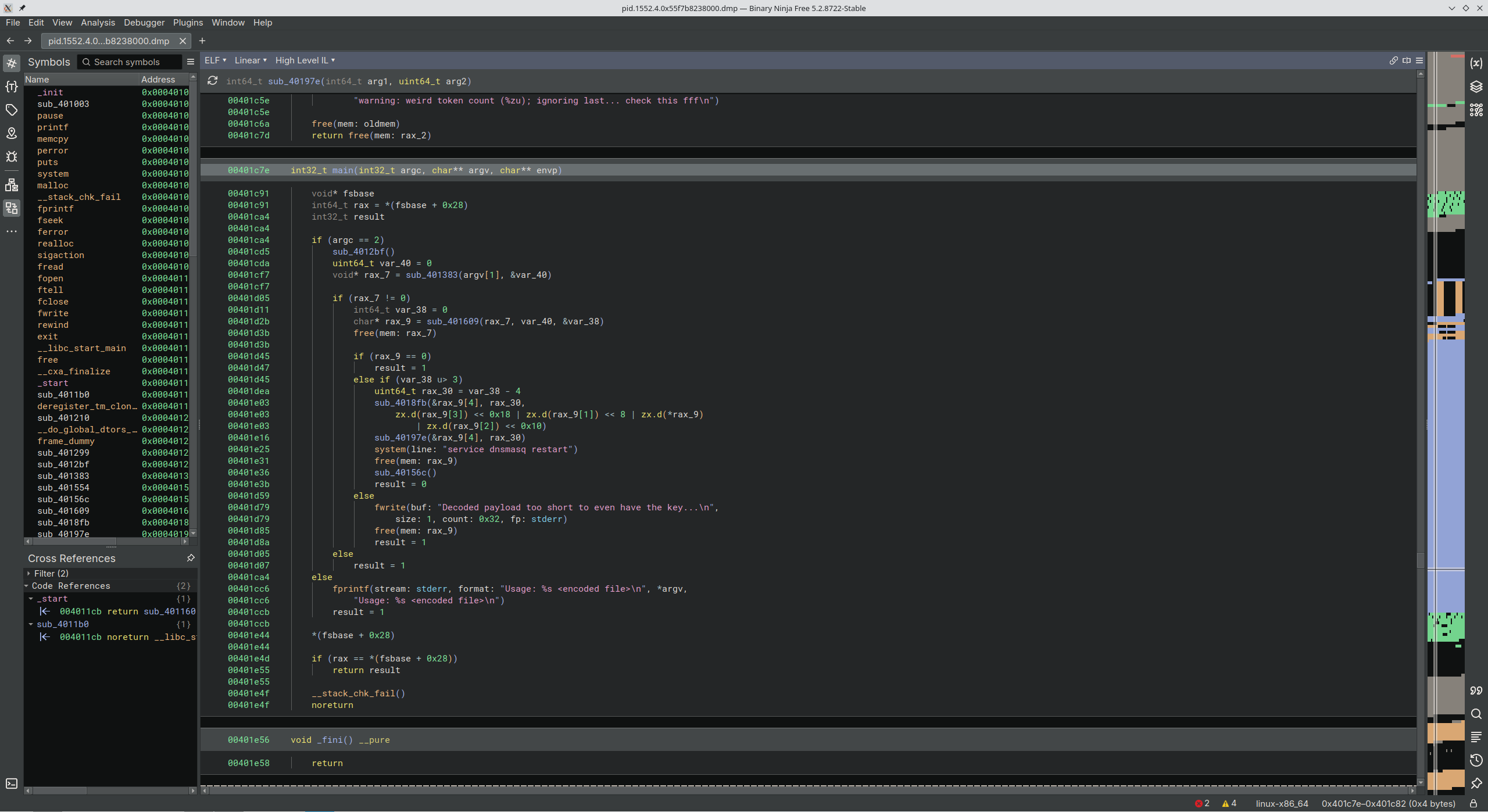
Awesome. Now step 1 is to see what main does. And thankfully, Binary Ninja placed it front and center:
int32_t main(int32_t argc, char** argv, char** envp) {
	void* fsbase
    int64_t rax = *(fsbase + 0x28)
    int32_t result

    if (argc == 2)
        sub_4012bf()
        uint64_t var_40 = 0
        void* rax_7 = sub_401383(argv[1], &var_40)

        if (rax_7 != 0)
            int64_t var_38 = 0
            char* rax_9 = sub_401609(rax_7, var_40, &var_38)
            free(mem: rax_7)

            if (rax_9 == 0)
                result = 1
            else if (var_38 u> 3)
                uint64_t rax_30 = var_38 - 4
                sub_4018fb(&rax_9[4], rax_30,
                    zx.d(rax_9[3]) << 0x18 | zx.d(rax_9[1]) << 8 | zx.d(*rax_9)
                        | zx.d(rax_9[2]) << 0x10)
                sub_40197e(&rax_9[4], rax_30)
                system(line: "service dnsmasq restart")
                free(mem: rax_9)
                sub_40156c()
                result = 0
            else
                fwrite(buf: "Decoded payload too short to even have the key...\n",
                    size: 1, count: 0x32, fp: stderr)
                free(mem: rax_9)
                result = 1
        else
            result = 1
    else
        fprintf(stream: stderr, format: "Usage: %s <encoded file>\n", *argv,
            "Usage: %s <encoded file>\n")
        result = 1

    *(fsbase + 0x28)

    if (rax == *(fsbase + 0x28))
        return result

    __stack_chk_fail()
    noreturn
}
The code begins here:
if (argc == 2) {
	sub_4012bf();
}
Meaning if the correct number of command-line arguments were supplied, this subroutine runs.
for (int32_t i = 0; i s<= 0xff; i += 1)
    *(sx.q(i) + &data_404040) = 0xff

for (int32_t i_1 = 0x41; i_1 s<= 0x5a; i_1 += 1)
    *(sx.q(i_1) + &data_404040) = i_1.b - 0x41

for (int32_t i_2 = 0x61; i_2 s<= 0x7a; i_2 += 1)
    *(sx.q(i_2) + &data_404040) = i_2.b - 0x47

for (int32_t i_3 = 0x30; i_3 s<= 0x39; i_3 += 1)
    *(sx.q(i_3) + &data_404040) = i_3.b + 4

data_40406b = 0x3e
data_40406f = 0x3f
data_40407d = 0xfe
Kind of unreadable but we’ll circle back to this later if necessary.
Next comes this:
uint64_t var_40 = 0
void* rax_7 = sub_401383(argv[1], &var_40)
And its subroutine:
int64_t sub_401383(char* arg1, uint64_t* arg2)
    printf(format: "opening %s\n", arg1)
    FILE* fp = fopen(filename: arg1, mode: "rb")

    if (fp == 0)
        perror(s: "fopen")
        return 0

    printf(format: "opened %s\n", arg1)

    if (fseek(fp, offset: 0, whence: 2) != 0)
        perror(s: "fseek")
        fclose(fp)
        return 0

    int64_t count = ftell(fp)

    if (count s< 0)
        perror(s: "ftell")
        fclose(fp)
        return 0

    rewind(fp)
    int64_t buf = malloc(bytes: count + 1)

    if (buf == 0)
        perror(s: "malloc")
        fclose(fp)
        return 0

    uint64_t rax_16 = fread(buf, size: 1, count, fp)

    if (ferror(fp) == 0)
        *(rax_16 + buf) = 0
        fclose(fp)
        *arg2 = rax_16
        return buf

    perror(s: "fread")
    free(mem: buf)
    fclose(fp)
    return 0
This opens the command-line argument as a file, meaning whatever gets passed in must be a file.
Continuing, if it returns a non-zero value, execution continues into the rest of main. Otherwise, result is set to 1 and the program exits early.
rax_9 seems to be used a lot in main, let’s see what it is. Have to enter subroutine sub_401609 for analysis.
Never mind, sub_401609 is gigantic. Let me continue through main and just see if anything useful is in there.
Its arguments are argv_file_buffer, 0, and 0.
Continuing on, I found this a few lines down.
void* sub_4018fb(int64_t arg1, int64_t arg2, int32_t arg3)
    char var_17 = arg3.b
    int32_t var_14 = arg3
    void* i

    for (i = nullptr; i u< arg2; i += 1)
        var_14 += 0x722633ad
        char rax_8 = *(i + arg1)
        *(i + arg1) = rax_8 ^ (var_14 u>> 0xd).b ^ var_14.b ^ var_17
        var_17 = rax_8

    return i
And its caller:
sub_4018fb(
	&rax_8[4],
	rax_29,
	zx.d(rax_8[3]) << 0x18 | zx.d(rax_8[1]) << 8 | zx.d(*rax_8) | zx.d(rax_8[2]) << 0x10
)
I think this is the code decryption function. Wanna know why? Because the next subroutine in main contains these lines:
puts(str: "opening /etc/hosts")
FILE* rax_37 = fopen(filename: "/etc/hosts", mode: "a")
And the arguments are the same registers coming in from the supposed decryption function.
With some renaming, I uncover more code logic:
decryptor(
	&encrypted_buffer[4],
	minus_four,
    zx.d(encrypted_buffer[3]) << 0x18 | zx.d(encrypted_buffer[1]) << 8 | zx.d(*encrypted_buffer) | zx.d(encrypted_buffer[2]) << 0x10
)
I’m gonna try to write a Python equivalent of this. Maybe I can make it parse the base64 data the same way the decompiled C does.
import base64
import sys

def decryptor(
	data: bytearray, # arg1
	length: int,     # arg2
	key: int         # arg3
) -> None:
	"""
	most likely guesses at the parameters:
		arg1 = pointer to data (bytearray)
		arg2 = length
		arg3 = initial key (int32)
	"""

	var_17 = key & 0xFF           # arg3.b
	var_14 = key & 0xFFFFFFFF     # arg3

	for i in range(length):
		# var_14 += 0x722633ad
		var_14 = ( var_14 + 0x722633ad ) & 0xFFFFFFFF

		# rax_8 = *( i + arg1 )
		original_byte = data[ i ]

		#  *( i + arg1 ) = rax_8  ^   ( var_14 u>> 0xd )  .b     ^  var_14   .b      ^ var_17
		data[ i ] = original_byte ^ ( ( var_14 >> 0xd ) & 0xFF ) ^ ( var_14 & 0xFF ) ^ var_17

		# var17 = rax_8
		var_17 = original_byte   # previous plaintext byte feeds next round


def extract_key( buf: bytes ) -> int:
	"""
	From main:
		zx.d( buf[ 0 ] )        |
		zx.d( buf[ 1 ] ) << 8   |
		zx.d( buf[ 2 ] ) << 16  |
		zx.d( buf[ 3 ] ) << 24
	"""
	return (
		buf[ 0 ]
		| ( buf[ 1 ] << 8 )
		| ( buf[ 2 ] << 16 )
		| ( buf[ 3 ] << 24 )
	)


if __name__ == "__main__":
	if len( sys.argv ) != 2:
		print( f"Usage: { sys.argv[ 0 ] } <encoded file>", file=sys.stderr )
		sys.exit( 1 )

	with open( sys.argv[ 1 ], "rb" ) as f:
		raw = f.read()

	decoded = base64.b64decode( raw )

	if len( decoded ) <= 3:
		print( "Decoded payload too short to even have the key...", file=sys.stderr )
		sys.exit( 1 )

	# first 4 bytes = key, rest = ciphertext
	key = extract_key( decoded[ :4 ] )
	ciphertext = bytearray( decoded[ 4: ] )

	decryptor( ciphertext, len( ciphertext ), key )

	# this gets passed into sub_40197e for writing to /etc/hosts
	# but we're gonna print it to see WHAT it is writing
	print( ciphertext.decode( errors="replace" ) )

	sys.exit( 0 )
Run it aaaand:
$ python3 crack2.py crack_this.txt
203.0.113.23 deb.debian.org 203.0.113.96 mirrors.kernel.org 203.0.113.23 security.debian.org 203.0.113.96 mirrors.alpinelinux.org 203.0.113.23 ftp.us.debian.org 203.0.113.96 mirrors.fedoraproject.org 203.0.113.23 dl-cdn.alpinelinux.org 203.0.113.62 pypi.org 203.0.113.96 geo.mirror.pkgbuild.com 203.0.113.23 us.archive.ubuntu.com 203.0.113.23 archive.ubuntu.org 203.0.113.62 files.pythonhosted.org 203.0.113.23 download1.rpmfusion.org 203.0.113.62 pypi.io 203.0.113.23 http.kali.org 203.0.113.96 mirrors.rockylinux.org 203.0.113.23 ports.ubuntu.org 203.0.113.96 mirrors.opensuse.org 203.0.113.23 repo.almalinux.org 203.0.113.23 archive.archlinux.org 203.0.113.23 ports.ubuntu.com 203.0.113.62 pypi.python.org 203.0.113.23 security.ubuntu.org 203.0.113.23 cache.nixos.org 203.0.113.23 repo-default.voidlinux.org 203.0.113.96 mirror.rackspace.com 203.0.113.96 mirrors.rpmfusion.org 203.0.113.23 dl.fedoraproject.org 203.0.113.23 archive.ubuntu.com 203.0.113.23 packages.linuxmint.com 203.0.113.23 distfiles.gentoo.org 203.0.113.23 security.ubuntu.com 203.0.113.23 repos.opensuse.org 203.0.113.23 download.opensuse.org 203.0.113.23 dl.rockylinux.org 203.0.113.96 mirror.stream.centos.org 203.0.113.96 xmirror.voidlinux.org
GOT IT!
After some reformatting for readability:
203.0.113.23 deb.debian.org
203.0.113.96 mirrors.kernel.org
203.0.113.23 security.debian.org
203.0.113.96 mirrors.alpinelinux.org
203.0.113.23 ftp.us.debian.org
203.0.113.96 mirrors.fedoraproject.org
203.0.113.23 dl-cdn.alpinelinux.org
203.0.113.62 pypi.org
203.0.113.96 geo.mirror.pkgbuild.com
203.0.113.23 us.archive.ubuntu.com
203.0.113.23 archive.ubuntu.org
203.0.113.62 files.pythonhosted.org
203.0.113.23 download1.rpmfusion.org
203.0.113.62 pypi.io
203.0.113.23 http.kali.org
203.0.113.96 mirrors.rockylinux.org
203.0.113.23 ports.ubuntu.org
203.0.113.96 mirrors.opensuse.org
203.0.113.23 repo.almalinux.org
203.0.113.23 archive.archlinux.org
203.0.113.23 ports.ubuntu.com
203.0.113.62 pypi.python.org
203.0.113.23 security.ubuntu.org
203.0.113.23 cache.nixos.org
203.0.113.23 repo-default.voidlinux.org
203.0.113.96 mirror.rackspace.com
203.0.113.96 mirrors.rpmfusion.org
203.0.113.23 dl.fedoraproject.org
203.0.113.23 archive.ubuntu.com
203.0.113.23 packages.linuxmint.com
203.0.113.23 distfiles.gentoo.org
203.0.113.23 security.ubuntu.com
203.0.113.23 repos.opensuse.org
203.0.113.23 download.opensuse.org
203.0.113.23 dl.rockylinux.org
203.0.113.96 mirror.stream.centos.org
203.0.113.96 xmirror.voidlinux.org
And we’re done.
Recap
- NSA has detected anomalous behaviours and we were handed a compromised computer’s filesystem, essentially its storage drive. We’ve successfully dug into it and discovered that there was a malicious actor on the device working with a suspicious file. We don’t know anything about any bad side effects just yet.
- Previously, we discovered that a computer was compromised on an internal network but we had zero idea about what that device was doing. In this task, we were given network activity involving that computer and any devices within that network segment. We found out that a router was serving poisoned DNS queries; redirecting otherwise normal visits to normal websites to malicious endpoints. The goal was to find the IPs associated with the router, presumably to trace which devices could have connected to it.
- We know that the infected router was throwing users onto a compromised domain, but we only saw it happen for
ubuntu.comrequests. The scale of the poisoning was unknown as there may have been many more additional compromised websites/IPs. Furthermore, we had no idea how the router was performing this. We uncovered a falsednsmasqprocess running and decoded the full list of IPs and domains which were being poisoned.