Hunting Malware in a PCAP with Wireshark
2025 NSA Codebreaker Challenge Task 2 (Network Forensics): dissecting a PCAP in Wireshark to trace malicious DNS and FTP traffic from an infected endpoint.
Challenge
Task 2 - The hunt continues - (Network Forensics)
With your help, the team concludes that there was clearly a sophisticated piece of malware installed on that endpoint that was generating some network traffic. Fortunately, DAFIN-SOC also has an IDS which retained the recent network traffic in this segment.
DAFIN-SOC has provided a PCAP to analyze. Thoroughly evaluate the PCAP to identify potential malicious activity.
Downloads:
- PCAP to analyze traffic.pcap
Action Items:
- Submit all the IP addresses that are assigned to the malicious device, one per line
Task 2 was amongst one of the more annoying tasks, but I’ll save that discussion for another day.
Let’s begin.
We’re given a .pcap file, or a packet capture file containing all network activity from that period of time.
The first course of action with packet captures is to send ‘em straight into Wireshark.
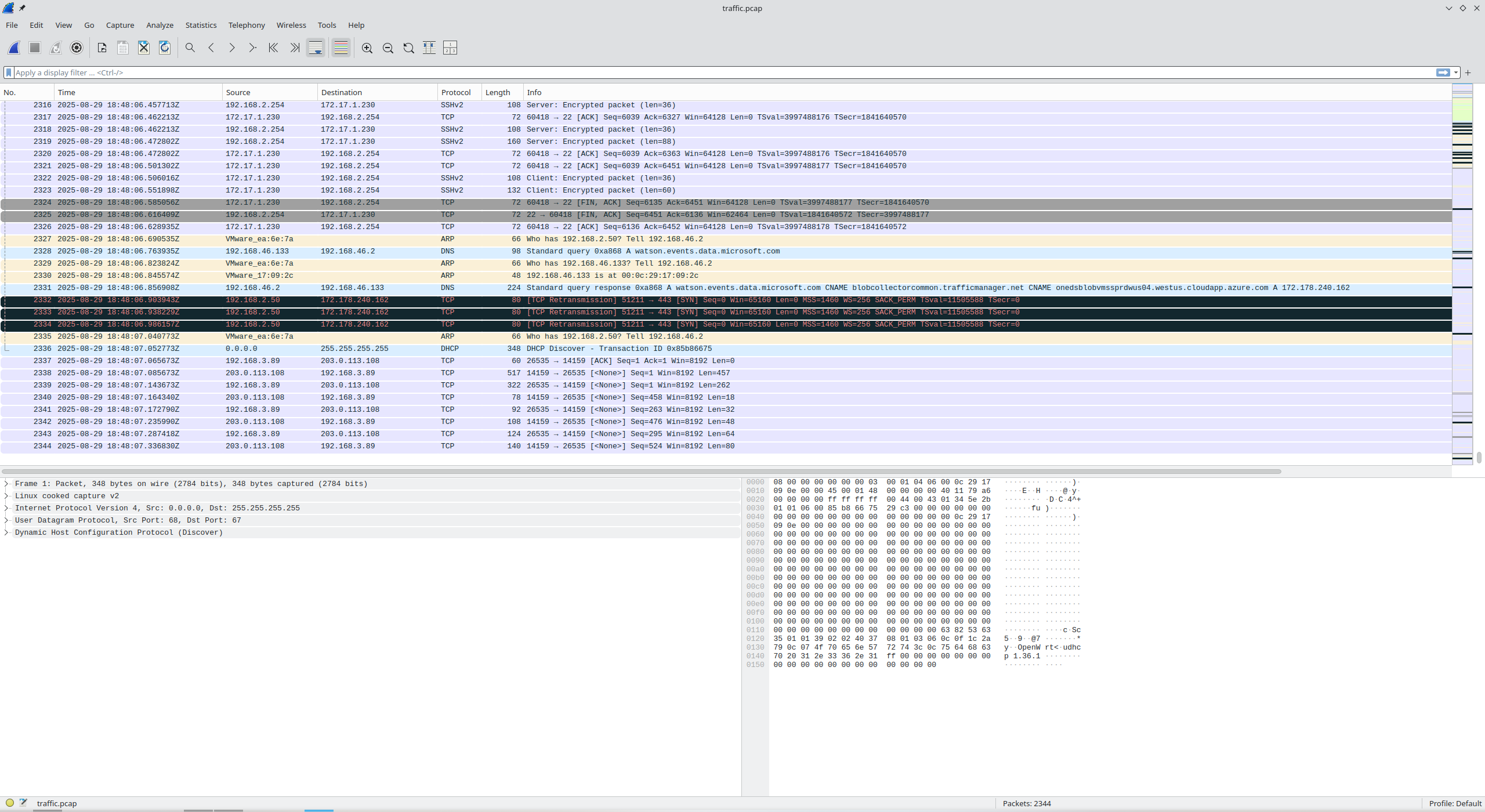
Scrolling to the very bottom, I’m greeted with a file containing a total of 2,344 packets. Quite a bit of data to sift through. One thing that’s always helpful to sort noise from usable information is to use the Protocol Hierarchy.
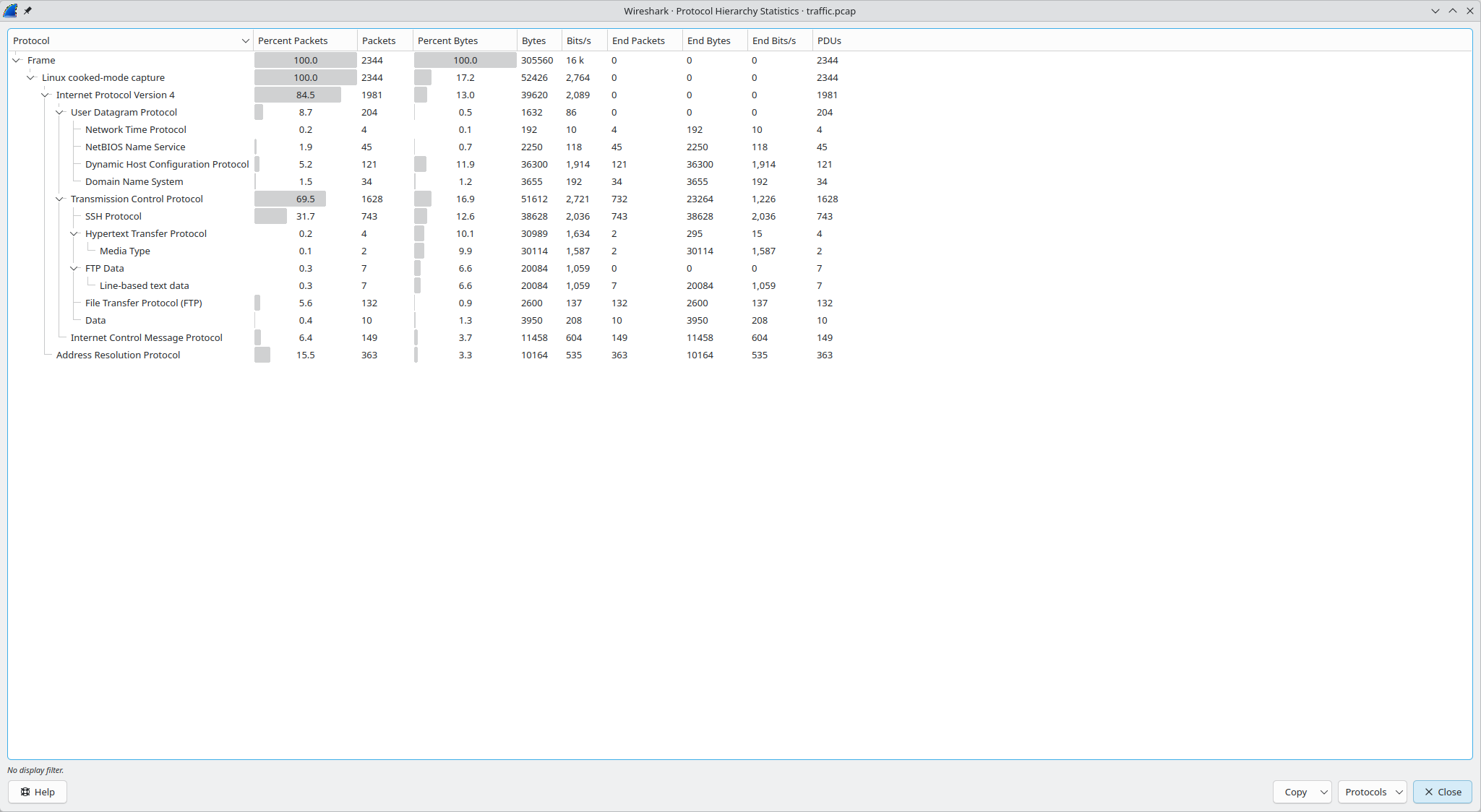
Now we have a solid breakdown of what’s going on. First off, the 2,344 packets are broken down into 363 Address Resolution Protocol packets and 1,981 IPv4 packets. Though at the moment, I’m going to focus on the TCP packets within IPv6, dropping our total search area to 1,628 packets. I’m especially curious at what the FTP data could be. Given that it’s a File Transfer Protocol, a malicious actor could have used that to smuggle data.
Let’s filter by FTP and see what we get:
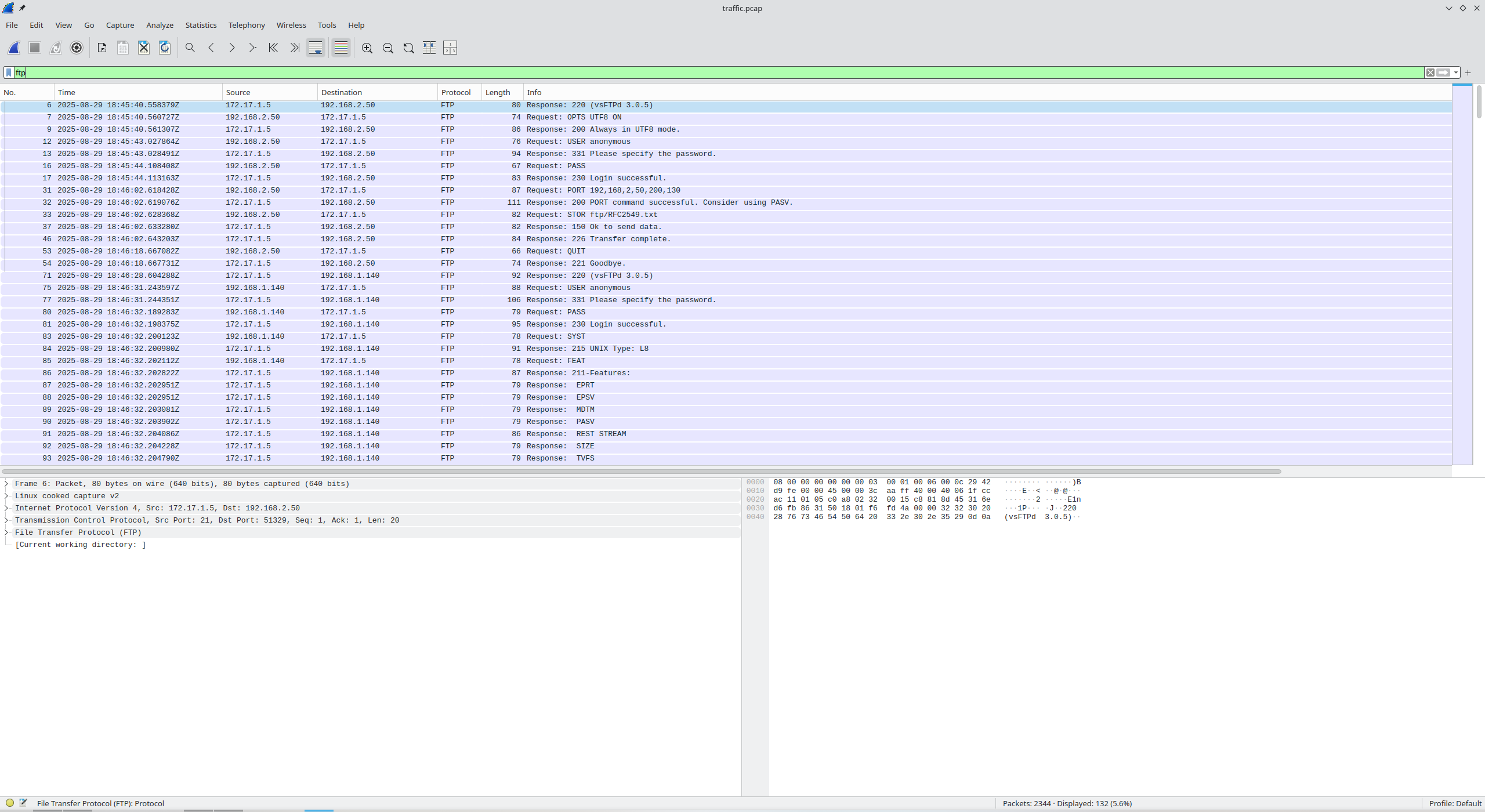
Following a random stream, we see:
220 (vsFTPd 3.0.5)

OPTS UTF8 ON

200 Always in UTF8 mode.

USER anonymous

331 Please specify the password.

PASS

230 Login successful.

PORT 192,168,2,50,200,130

200 PORT command successful. Consider using PASV.

STOR ftp/RFC2549.txt

150 Ok to send data.
226 Transfer complete.

QUIT

221 Goodbye.
This is a funny reference to a classic Request for Comments: RFC 2549. An internet standard based entirely on pigeons carrying digital data to destinations because infrastructure buildout was too slow. I advise everyone to go read it as it is quite humorous.
Network Working Group                                    D. Waitzman
Request for Comments: 2549                       IronBridge Networks
Updates: 1149                                           1 April 1999
Category: Experimental


            IP over Avian Carriers with Quality of Service

Status of this Memo

  This memo defines an Experimental Protocol for the Internet
  community.  It does not specify an Internet standard of any kind.
  Discussion and suggestions for improvement are requested.
  Distribution of this memo is unlimited.
Back to the streams, Wireshark allows you to follow streams one by one using a button in the bottom right of the Follow TCP Stream popup. Let’s continue looking through it.
Interesting discovery, TCP Stream 4 appears to be the output of an ls command:
-rw-r--r--    1 122      124          9856 Aug 29 14:44 RFC2549.txt
-rw-------    1 122      124           808 Aug 29 13:59 router1_backup.config
-rw-------    1 122      124          1339 Aug 29 14:05 router2_backup.config
-rw-------    1 122      124           842 Aug 29 14:06 router3_backup.config
-rw-------    1 122      124             0 Aug 29 13:51 test.txt
Router backups? And they’re configuration files? Something seems off here…
Streams 19, 27, and 36 have some clues about how each of the config files was moved:
Stream 19 (router1_backup)
220 (vsFTPd 3.0.5)

FEAT

211-Features:
 EPRT
 EPSV
 MDTM
 PASV
 REST STREAM
 SIZE
 TVFS
211 End

AUTH TLS

530 Please login with USER and PASS.

USER anonymous

331 Please specify the password.

PASS

230 Login successful.

PWD

257 "/" is the current directory

TYPE I

200 Switching to Binary mode.

PASV

227 Entering Passive Mode (172,16,1,5,66,33).

STOR ftp/router1_backup.config

150 Ok to send data.
226 Transfer complete.

SITE UTIME 20250829155125 ftp/router1_backup.config

550 Permission denied.

QUIT

221 Goodbye.
Stream 27 (router3_backup)
220 (vsFTPd 3.0.5)

FEAT

211-Features:
 EPRT
 EPSV
 MDTM
 PASV
 REST STREAM
 SIZE
 TVFS
211 End

AUTH TLS

530 Please login with USER and PASS.

USER anonymous

331 Please specify the password.

PASS

230 Login successful.

PWD

257 "/" is the current directory

TYPE I

200 Switching to Binary mode.

PASV

227 Entering Passive Mode (172,16,1,5,197,63).

STOR ftp/router3_backup.config

150 Ok to send data.
226 Transfer complete.

SITE UTIME 20250829155052 ftp/router3_backup.config

550 Permission denied.

QUIT

221 Goodbye.
Stream 36 (router2_backup)
220 (vsFTPd 3.0.5)

FEAT

211-Features:
 EPRT
 EPSV
 MDTM
 PASV
 REST STREAM
 SIZE
 TVFS
211 End

AUTH TLS

530 Please login with USER and PASS.

USER anonymous

331 Please specify the password.

PASS

230 Login successful.

PWD

257 "/" is the current directory

TYPE I

200 Switching to Binary mode.

PASV

227 Entering Passive Mode (172,16,1,5,100,87).

STOR ftp/router2_backup.config

150 Ok to send data.
226 Transfer complete.

SITE UTIME 20250829155113 ftp/router2_backup.config

550 Permission denied.

QUIT

221 Goodbye.
SITE UTIME seems to be a way of changing the time of the backups… wouldn’t that be auto-set? Dubious…
Digging further in, I find the contents of the three backup files: Stream 21 is router1_backup.config, Stream 28 is router3_backup.config, and Stream 37 is router2_backup.config.
router1_backup.config (Stream 21)
config interface 'loopback'
	option device 'lo'
	option proto 'static'
	option ipaddr '127.3.3.1'
	option netmask '255.0.0.0'

config globals 'globals'
	option ula_prefix 'fd10:95e0:f1b::/48'
	option packet_steering '1'

config device
	option name 'br-lan'
	option type 'bridge'
	list ports 'eth0'

config interface 'lan'
	option device 'br-lan'
	option proto 'static'
	option ipaddr '192.168.1.254'
	option netmask '255.255.255.0'
	option ip6assign '60'

config interface 'to_devnet'
	option proto 'static'
	option device 'eth1'
	option ipaddr '192.168.4.1'
	option netmask '255.255.255.240'

config route
	option interface 'lan'
	option target '192.168.1.0/24'
	option gateway '192.168.1.254'

config route 'to_lan2'
	option target '0.0.0.0/0'
	option gateway '192.168.4.2'
	option interface 'to_devnet'
router3_backup.config (Stream 28)
config interface 'loopback'
	option device 'lo'
	option proto 'static'
	option ipaddr '127.3.6.3'
	option netmask '255.0.0.0'

config globals 'globals'
	option ula_prefix 'fdf2:87c7:eb73::/48'
	option packet_steering '1'

config device
	option name 'br-lan'
	option type 'bridge'
	list ports 'eth0'

config interface 'lan'
	option device 'br-lan'
	option proto 'static'
	option ipaddr '192.168.3.254'
	option netmask '255.255.255.0'
	option ip6assign '60'

config interface 'to_openwrt2'
	option device 'eth1'
	option proto 'static'
	list ipaddr '192.168.5.1/28'

config interface 'host_nat'
	option proto 'dhcp'
	option device 'eth2'

config route
	option target '192.168.3.0/24'
	option gateway '192.168.3.254'
	option interface 'lan'

config route
	option target '0.0.0.0/0'
	option gateway '192.168.5.2'
	option interface 'to_openwrt2'
router2_backup.config (Stream 37)
config interface 'loopback'
	option device 'lo'
	option proto 'static'
	option ipaddr '127.7.9.2'
	option netmask '255.0.0.0'

config globals 'globals'
	option ula_prefix 'fd45:7f60:3ad5::/48'
	option packet_steering '1'

config device
	option name 'br-lan'
	option type 'bridge'
	list ports 'eth0'

config interface 'lan'
	option device 'br-lan'
	option proto 'static'
	option ipaddr '192.168.2.254'
	option netmask '255.255.255.0'

config interface 'wan'
	option device 'eth1'
	option proto 'dhcp'

config interface 'to_devnet'
	option proto 'static'
	option device 'eth1'
	list ipaddr '172.16.1.254/24'

config interface 'to_lan1'
	option proto 'static'
	option device 'eth2'
	list ipaddr '192.168.4.2/28'

config interface 'to_lan3'
	option proto 'static'
	option device 'eth3'
	list ipaddr '192.168.5.2/28'

config interface 'to_host_nat'
	option proto 'dhcp'
	option device 'eth4'

config route 'route_to_devnet'
	option interface 'to_devnet'
	option target '172.16.1.0/24'
	option gateway '172.16.1.254'

config route
	option interface 'lan'
	option target '192.168.2.0/24'
	option gateway '192.168.2.254'

config route 'route_to_lan1'
	option target '192.168.1.0/24'
	option gateway '192.168.4.1'
	option interface 'to_lan1'

config route
	option target '192.168.3.0/24'
	option gateway '192.168.5.1'
	option interface 'to_lan3'
Stream 37 is also the last TCP stream. I have a hunch the poisoned device’s IPs are in here somewhere, but the question is, which of the 3 routers is actually infected?
Perhaps its time to look at what each router was doing. DNS is a great way to see this. Thanks to the config dumps above, I know what the local IPs for each of those routers are:
- Router 1:
192.168.1.254 - Router 2:
192.168.2.254 - Router 2:
192.168.3.254
Apply the filter dns
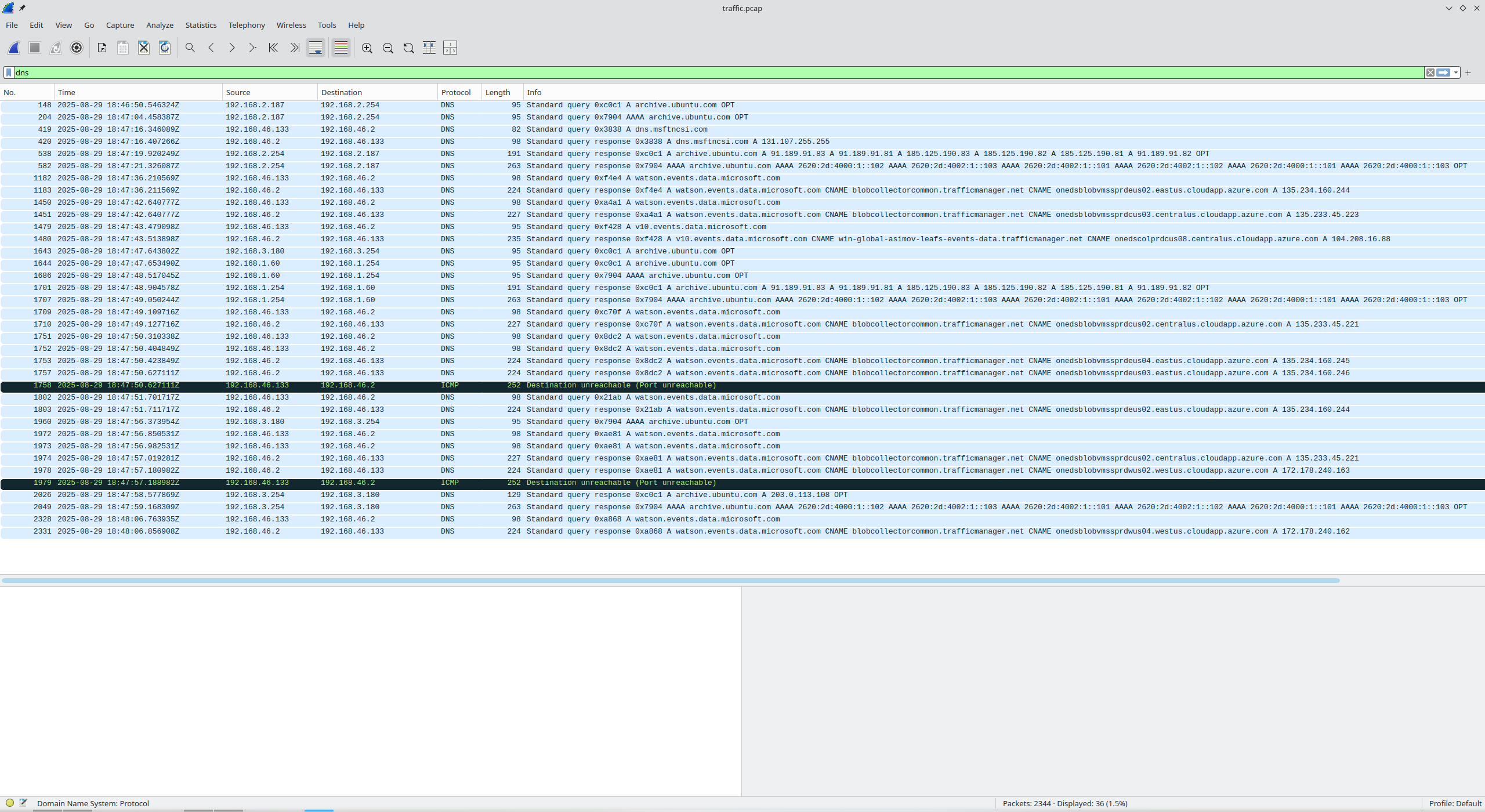
Now we have only a handful of requests to look through.
Applying dns && ip.src==192.168.[1,2,3].254:



Or applying this one-liner filter:
dns && (ip.src==192.168.1.254 || ip.src==192.168.2.254 || ip.src==192.168.3.254)

And there is IMMEDIATELY something peculiar.
Router 3 (192.168.3.254) is serving a poisoned IP address (203.0.113.108) for archive.ubuntu.com, a legitimate domain instead of 91.189.91.83. Visiting 91.189.91.83 actually leads you to an official Ubuntu security notices page. Furthermore, after some research, I found RFC 5737, which very clearly states in Section 3:
3. Documentation Address Blocks
The blocks 192.0.2.0/24 (TEST-NET-1), 198.51.100.0/24 (TEST-NET-2), and 203.0.113.0/24 (TEST-NET-3) are provided for use in documentation.
Ladies and gentlemen, we have found the infected device.
However, we’re not completely done just yet. Entering 192.168.3.254 correct, but doesn’t allow me to proceed. It instead provides a hint:
There might be more associated IP addresses. Keep looking.
This is where I got stuck for a long time. The answer? I was missing the loopback address. To find it, let’s go back to the router configs from earlier.
Examining Router 3’s configuration, we see 3 distinct addresses that devices might connect to:
- LAN IP gateway address:
192.168.3.254 - External interface
192.168.5.1connecting to OpenWRT2 also targets ALL traffic via0.0.0.0/0 - Loopback IP addresses are almost always
127.0.0.1for a device to communicate with itself, not127.3.6.3
Therefore, the answer is:
192.168.3.254192.168.5.1127.3.6.3
Recap
- NSA has detected anomalous behaviours and we were handed a compromised computer’s filesystem, essentially its storage drive. We’ve successfully dug into it and discovered that there was a malicious actor on the device working with a suspicious file. We don’t know anything about any bad side effects just yet.
- Previously, we discovered that a computer was compromised on an internal network but we had zero idea about what that device was doing. In this task, we were given network activity involving that computer and any devices within that network segment. We found out that a router was serving poisoned DNS queries; redirecting otherwise normal visits to normal websites to malicious endpoints. The goal was to find the IPs associated with the router, presumably to trace which devices could have connected to it.