Exploring Tesla's Vehicle Command Protocol
Reverse engineering Tesla's Vehicle Command Protocol — the end-to-end command authentication and cryptography behind the modern Tesla Fleet API.
Background
Recently, I’ve been working on a new project, for now I call it CarTracker (yes it’s a wonderful name, the best name in fact.)
[update - 6 July 2026]
It’s been renamed to Nikola.
My goal for CarTracker was to be able to make my own Tesla companion application, similar to Tessie. I remember downloading Tessie and being absolutely astonished by how many inner data points were actually readable from my car. Over time, I thought about just making my own Tessie.
I figured it’d be a simple endeavour:
- Create a basic React frontend
- Wire it to something like a FastAPI backend
- Off to the races!
…as you may have assumed by now, it was not that simple.
For some context, Tesla used to have a very straightforward, Auth: Bearer REST API.
You could run something along the lines of:
CLIENT_ID=https://blog.byseansingh.com
CLIENT_SECRET=ta-secret.abcdefghijklmnopqrstuvwxyz
AUDIENCE="https://fleet-api.prd.na.vn.cloud.tesla.com"

curl --request POST \
	--header 'Content-Type: application/x-www-form-urlencoded' \
	--data-urlencode 'grant_type=client_credentials' \
	--data-urlencode "client_id=$CLIENT_ID" \
	--data-urlencode "client_secret=$CLIENT_SECRET" \
	--data-urlencode 'scope=openid vehicle_device_data vehicle_cmds vehicle_charging_cmds' \
	--data-urlencode "audience=$AUDIENCE" \
	'https://fleet-auth.prd.vn.cloud.tesla.com/oauth2/v3/token'
	{
		"access_token":"",
		"expires_in":28800,
		"token_type":"Bearer"
	}
To obtain an Auth token, and then
curl -H "Authorization: Bearer 1234" \
	-i https://fleet-api.prd.na.vn.cloud.tesla.com/api/1/dx/charging/history
To interact with any part of your Tesla vehicle (including functions not available in the Tesla app).
Unfortunately, at some point in 2022, Tesla deprecated this API in the name of security. That endpoint above should still work as it’s not for direct vehicle control, but that’s also the issue: I can’t really do much with it.
There’s a much more sophisticated way to interact with the Fleet API now.
That’s where this comes in:
https://github.com/teslamotors/vehicle-command
Tesla vehicles now support a protocol that provides end-to-end command authentication. This Golang package uses the new protocol to control vehicle functions, such as climate control and charging.
This is a proxy server written in Go designed for Tesla third-party developers. Instead of pinging Tesla directly, a developer can host a vehicle-command server to authorize and sign requests, which then get forwarded to a car. For instance, to lock my car:
TESLA_AUTH_TOKEN=https://withcapsule.dev
VIN=averylegitvehicleidentificationnumber

curl --cacert cert.pem \
    --header 'Content-Type: application/json' \
    --header "Authorization: Bearer $TESLA_AUTH_TOKEN" \
    --data '{}' \
    "https://localhost:6769/api/1/vehicles/$VIN/command/door_lock"
Tesla’s repository has a very nice diagram of the paths:
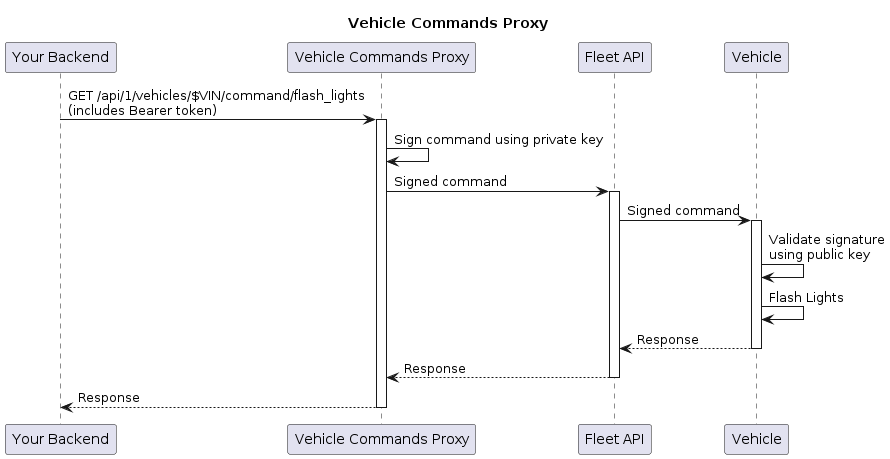
Unfortunately for me, I wanted to continue learning Rust since I had actually started liking the language a decent bit.
So, what better way to learn Rust than to port the Go library into a Rust implementation!
This turned into a massive cryptographic rabbit hole, detailed below.
How does the new API secure commands?
Trusting the Server
Before an app can ask the car for anything at all, it needs a valid keypair that the car will recognize. This happens once on app startup and is reused until the application is restarted.
A server-side key is generated once via:
openssl ecparam -name prime256v1 -genkey -noout -out private-key.pem
And upon first execution (main.rs:122), the server:
// reads the actual key on disk
let pemfile = read_to_string( "../CarKey/private-key.pem" ).unwrap_or_else(...);
let secret_key = load_p256_key( &pemfile ).unwrap_or_else(...);

// saves each key as bytes for use later
let public_key_bytes = secret_key.public_key().to_sec1_bytes().to_vec();
let secret_key_bytes: [ u8; 32 ] = secret_key.to_bytes().into();
public_key_bytescontains the full uncompressed point,0x04 | X | Y. This gets sent to the car.secret_key_bytescontains the raw 32-byte scalar. This must never leave the server and is also what makes the Elliptic-curve Diffie–Hellman (ECDH) step later possible.
For authenticity, the public key must also be hosted at:
https://www.domain.tld/.well-known/appspecific/com.tesla.3p.public-key.pem
- Fun fact:
.well-known/is actually an internet standard declared by RFC 8615. More info here.
But how does the car know to trust whatever is at https://www.domain.tld? Or even go there in the first place?
Well this is how!
- You register your domain + hosted public key with Tesla ahead of time, through the Developer Accounts Portal. This is the point where Tesla’s own backend fetches your .well-known URL. People can now use your app to connect your site to their cars.
- Your app supplies a special link:
https://tesla.com/_ak/<domain.tld>to a user. - They tap it, which opens their own Tesla app prompting them to add your app’s Virtual Key.
- The Tesla app shows them your domain name and explicitly asks them to approve the request.
- Only if they approve does the Tesla app send a pairing command to the vehicle (using its existing authenticated connection to the car).
- The public key and domain are now trusted by the car and effectively hardcoded in with the installation of the Virtual Key.
The car is now able to trust the server, but encrypted communication isn’t possible just yet. Once we get to signing commands, this trust gives us authentication (proving a command really came from a key the car trusts), not necessarily confidentiality of the command itself.
Establishing Secure Connection to the Car
Once the virtual key has been added to the car, one-way trust has been established.
The next step to this is requesting a SessionInfo data structure from the car.
A sample request (represented as JSON):
{
	"to_destination": {
		"domain": "DOMAIN_VEHICLE_SECURITY"
	},

	"from_destination": {
		"routing_address": "8f3a1c9d2e4b7061a5c8d9e0f1a2b3c4"
	},

	"session_info_request": {
		"public_key": ""
	},

	"uuid": "1d4e6f70a1b2c3d4e5f60718a9bacbdc"
}
Some explanations:
-
Destination domain: Tesla has 2 main vehicle “control regions” (called domains) -
DOMAIN_INFOTAINMENT, andDOMAIN_VEHICLE_SECURITY.- Infotainment: self-explanatory, these are harmless commands like pausing music or sending navigation addresses. Mildly annoying at worst.
- Vehicle Security (also sometimes referred to as
VCSEC) - more dangerous/critical commands, such as locking/unlocking/remote starting car. Can be used maliciously.
-
From Destination: the server generates a random string as a “From Here” address. Not too big of a deal, gets reversed as “to_destination” when the car replies.
-
Session Info Request: this one is important and quite useful
public_key- self-explanatory, this contains the server’s public key, same as the one hosted on the well-known URL- Must match the server’s publicly hosted key and the car’s inbuilt whitelist (from the Virtual Key pairing process earlier)
-
UUID - a simple identifier to match the car’s response to a server’s request
- Not really used in my Tesla API implementation - this is more useful in BLE scenarios where multiple requests across multiple cars could be beaming at once. API-wise, it’s just sending a single request and awaiting that single response over a secure channel.
Once sent, the car replies with a SessionInfo structure.
Side note: SessionInfo only needs to be pulled from the car in two scenarios:
- No cached session information exists.
- The car went to sleep. This can’t be checked proactively, only reactively. If a command is sent to the car and an
IncorrectEpochorInvalidTokenOrCounterresponse arrives, the server needs to pull a freshSessionInfofrom the vehicle.
If neither of those situations apply, the cached SessionInfo can be reused to build a control packet.
Also, the reason the session goes stale when the car sleeps is some interesting EV trivia. If you park an EV, lock it, and switch off Bluetooth on your phone (so it thinks you walked away), you’ll hear a “thud” sound come from the car in about 5-10 minutes time. That sound is the contactor dropping, which is just another way to say “the car has disconnected the High Voltage Battery” from the rest of the vehicle. This is also why unlocking any EV that’s been parked for a while usually emits a “double-click” sound. Since on each wake-up, the contactors close again to make contact between the motor and the HV battery. Each one of these wake cycles generates a brand new session epoch, which is exactly what turns a Session stale and triggers a retry.
Sourced directly from signatures.proto, here’s what it nets you:
message SessionInfo {
	uint32  counter            = 1;
	bytes   publicKey          = 2;
	bytes   epoch              = 3;
	fixed32 clock_time         = 4;
	Session_Info_Status status = 5;
	uint32  handle             = 6;
}
In practice, this maps to something like:
{
  "counter": 47,
  "publicKey": "04 91 AA 1E 3C 8F 24...42",
  "epoch": "3F 9C 2A 8B 1D 4E 6F 70 A1 B2 C3 D4 E5 F6 07 18",
  "clock_time": 1782192,
  "status": "SESSION_INFO_STATUS_OK",
  "handle": 3
}
Let’s dig through it:
counter- replay attack protection. If someone manages to snag this packet, it becomes useless. The server must reply with an incremented counter and by the time a request gets replayed, the car’s onboard Counter has moved on.publicKey- there it is, the car’s public key! Using this, ECDH and establishing a secure connection becomes possible.- Stay tuned: an ECDH demo is coming soon :)
epochis 16 random bytes the car generates whenever its session resets (e.g. after one of those wake-up cycles above).clock_timeis the car’s onboard clock, in seconds.statusis a massive gatekeeper. If it ain’tSESSION_INFO_STATUS_OK, then something went wrong and nothing can move forward from here.
Now, we successfully have:
- Server’s public key on the car
- Car’s public key on the server
- Both keep their own respective private keys (duh)
Deriving the AES Key
Now that all keys are in the correct locations, the ECDH step that’s been hinted at is finally possible.
Some information about how ECDH works if you're curious
It works by:
- Computer A reads Computer B’s public key
- Computer A reads its own private key
- Computer A constructs a “shared point” via performing arithmetic on the keys.
- Computer B reads Computer A’s public key
- Computer B reads its own private key
- Performing the same mathematical operations leads Computer B to also arrive at that same shared secret value.
To be more precise:
- Private key contains a secret scalar
- Public key contains an elliptic curve point derived from the private key
- But the opposite (getting the scalar back from the elliptic curve), is nigh impossible
- Arithmetic performed: Computer A uses its own private key and Computer B’s public key to perform elliptic curve scalar multiplication to produce a shared elliptic curve point
- If Computer B does the same thing using its private key and A’s pubkey, the same shared elliptic curve point can be derived independently
How is this secure?
- The security comes from the fact that public keys don’t reveal the corresponding private keys, and knowing both public keys still isn’t enough to compute the shared secret.
- If an attacker can intercept and replace public keys during the exchange, they can perform a man-in-the-middle attack, establishing one shared secret with A and a different one with B while relaying messages between them. This is another reason why the public key must always be hosted on
https://www.domain.tld.
Onto the code:
// private key on server:
let secret_key = p256::SecretKey::from_bytes( secret_key_bytes );

// public key from SessionInfo
let public_key = p256::PublicKey::from_sec1_bytes( vehicle_pub_bytes );

let shared =
	p256::ecdh::diffie_hellman(
	 	secret_key.to_nonzero_scalar(),
		public_key.as_affine()
	);

let digest = Sha1::digest( shared.raw_secret_bytes() );

let aes_key = &digest[ ..16 ];
Woah, what’s going on here?
I’ll tell you what: it’s standard ECDH operations. That diffie_hellman() function takes in the secret key and public key and returns the shared secret.
That’s really it to using ECDH. So much work went into it and it’s a one-liner in everyone’s code. Kind of wild to think about.
Since that shared key is already impossible for someone else to derive, Tesla uses it to build out an AES key.
raw_secret_bytes()returns the X-coordinate of that shared point (length: 32 bytes)- That 32-byte X-coordinate gets run through the SHA-1 algorithm and saved as
digest(standard SHA1 hash: 20 bytes) - The first 16 bytes of the resulting 20-byte digest become the seed for generating an AES-128 key
An interesting twist
Despite being an AES key, it's never actually used to AES-encrypt anything! The only thing this key does is feed into a future step (spoiler: it's HMAC).
T.L.V. (not the airport)
Tag. Length. Value. A format for encoding a vehicle control request. We’re now finally at the stage where the user’s desired request is taken into account.
Here’s the gist of the TLV format.
structure:
[1 byte: tag][1 byte: len][N bytes: val]

usage:
[0x00][0x01][0x08]
 ^^^^  ^^^^  ^^^^
  \      \     \---- N bytes containing the value alluded to by the length tag
   \      \--------- One byte indicating the length (N) of the next item
    \--------------- One byte indicating the tag ID, e.g. 0x01, 0x02...


example:
[0x02][0x11][31 48 47 43 4D 38 32 36 33 33 41 30 30 34 33 35 32]
Broken down, that example evaluates to:
Tag:     0x02  (item #3 after 0x00 and 0x01)
Length:  0x11  (17 bytes)
Value:   "1HGCM82633A004352"
The full TLV format is as follows:
| TLV Code | Meaning | Value |
|---|---|---|
0x00, 0x01, 0x08 | SignatureType = SIGNATURE_TYPE_HMAC_PERSONALIZED | always fixed |
0x01, 0x01, domain | Domain | 2 or 3, 1 byte |
0x02, 0x11, vin_bytes | Personalization (VIN) | VINs are always 17 bytes |
0x03, 0x10, epoch | Epoch | 16 bytes directly from SessionInfo |
0x04, 0x04, expires_at | Expiry | u32 big-endian, in car-clock seconds |
0x05, 0x04, counter | Counter | u32 big-endian |
0x07, 0x04, flags | Flags | Included only if set. I always set FLAG_ENCRYPT_RESPONSE, so this is always present for me |
0xFF | End-of-TLV marker | fixed |
| … | the raw plaintext command bytes, appended right after the 0xFF |
Expiry is computed as car_clock_now + 10, where car_clock_now is the last known clock_time plus however many seconds have elapsed on the server since SessionInfo was fetched.
This prevents the command from being intercepted and re-transmitted. If the server specifies to use only the minimum amount of time between now and expiry, the entire packet
expires by the time an attacker grabs it and retransmits it.
Counter is there to prevent replay attacks. If an attacker nabs the TLV structure, but the car already accepted the one the server sent, the car’s Counter increments and the TLV structure is now below the required Counter number. This means that the command is being “replayed” to the car, and thanks to the counter variable, the EV knows to reject the incoming command. It’s also good practice to place the incrementing of the counter under a mutex to protect its synchronization with the car.
The Actual Vehicle Control Command
We’re now at a stage where the TLV has been built, but it contains no information about what the user actually wants to do.
That’s where the plaintext bytes come in (as mentioned in the TLV table right after 0xFF). The TLV is only one part of what
becomes a RoutableMessage the car will accept.
Let’s examine the trunk handler, a working example in my backend:
let vcsec_msg = UnsignedMessage {
	sub_message: Some(
			SubMessage::ClosureMoveRequest(
				ClosureMoveRequest {
					rear_trunk: ClosureMoveTypeE::ClosureMoveTypeMove as i32,
					..Default::default()
				}
		 )
	),
};

send_signed_command( &state, &access_token, &vin, DOMAIN_VCSEC, vcsec_msg.encode_to_vec() );
Going one level deeper into the protobuf structures:
// notice how in my Rust, I have `rear_trunk` written. that API call currently only moves the trunk
// though it could absolutely be wired to control any vehicle doors
pub struct ClosureMoveRequest {
    pub front_driver_door: i32,
    pub front_passenger_door: i32,
    pub rear_driver_door: i32,
    pub rear_passenger_door: i32,
    pub rear_trunk: i32,
    /* … */
}

// the ClosureMoveType mappings when constructing the command bytes
pub enum ClosureMoveTypeE {
    ClosureMoveTypeNone = 0,
    ClosureMoveTypeMove = 1,  // this one toggles the trunk, if opened -> close, if closed -> open
    ClosureMoveTypeStop = 2,
    ClosureMoveTypeOpen = 3,
    ClosureMoveTypeClose = 4,
}
Let’s trace through the trunk handler:
-
UnsignedMessageis aoneofin Rust. Meaning it only accepts certain kinds ofsub_messageparameters.- InformationRequest
- RkeAction
- ClosureMoveRequest
- WhitelistOperation
-
Aha, there it is: ClosureMoveRequest. The decorator on it is
#[prost(message, tag = "4")]. -
ClosureMoveRequest is what actually specifies the door field and desired command
-
rear_trunk: ClosureMoveTypeE::ClosureMoveTypeMove as i32- Selects the rear trunk attribute
- Assigns a ClosureMoveTypeMove with a 32 bit integer cast
- Later gets compiled down to 1
-
After all processing concludes, the bytes for “Toggle Trunk” come out to be:
0x22 0x02 0x28 0x01
That’s it!
- Then finally, send that signed command… with one more step still…
The HMAC Tag
This is the actual signature that authenticates the command. It’s a two-stage process:
K_prime  = HMAC-SHA256( key = aes_key,  msg = "authenticated command" )
tag      = HMAC-SHA256( key = K_prime,  msg = TLV || 0xFF || plaintext_command )
Why two HMAC calls instead of one straight HMAC-SHA256(aes_key, TLV || plaintext)?
The first signing key, K’, is derived directly from the AES key constructed earlier. Its purpose is to create a key cryptographically tied to the hardcoded “authenticated command” string.
The second HMAC call is a pass over the RoutableMessage’s TLV metadata, the 0xFF terminator, and the
plaintext command bytes together. Because it’s HMAC, only someone who can derive K' (which requires
a private key on one side or the other) can produce a tag that matches. Suppose an attacker grabs an
in-flight TLV. It’s useless to them as they have no possible means to derive the underlying private
codes. They can reconstruct the TLV’s shape (a plausible-looking counter, epoch, car public key, etc.)
but they can’t produce a tag that matches it without K’.
Why doesn't seeing the tag leak K'?
This is the actual cryptographic guarantee HMAC provides: it's a pseudorandom function. Meaning even when given infinite
sets of pairs of `( message, HMAC( K', message ) )`, there is no possible way to compute K' or the correct tag for
a different message you didn't already see signed.
If someone taps the connection between your server and Tesla's Fleet API (or the car), they see the entire signed command containing:
- The full TLV metadata (domain, VIN, epoch, expiry, counter, flags)
- The plaintext command bytes (e.g. `0x22 0x02 0x28 0x01` -> "toggle trunk")
- The tag itself
- Server's full public key
Nothing in that list is secret. The entire point of the scheme is that this can all be public and it's still safe, as long as nobody can produce a new valid tag without K'.
Furthermore, even a perfectly captured, fully valid signed command is useless to replay later, independent of all of this as:
1. The counter gets consumed the moment the car accepts it
2. The expiry time gives the entire packet a very short shelf life regardless.
Here’s how that looks in Rust:
let mut k = HmacSha256::new_from_slice( aes_key ).unwrap_or_else(...);
k.update( b"authenticated command" );
let kprime = k.finalize().into_bytes();

let mut tlv = HmacSha256::new_from_slice( &kprime ).unwrap_or_else(...);
tlv.update( /* TLV fields, one update() call per field */ );
tlv.update( &[0xFF] );      // append the end signal
tlv.update( plaintext );    // append the command bytes

return tlv.finalize().into_bytes().to_vec();
The Finally Final Message
let final_msg = RoutableMessage {
	to_destination: Domain( domain ),
	from_destination: RoutingAddress( random 16 bytes ),

	flags: FLAGS_ENCRYPT_RESPONSE,

	payload: ProtobufMessageAsBytes( bytecode ),   // 0x22 0x02 0x28 0x01

	sub_sig_data: SignatureData( SignatureData {
		signer_identity: KeyIdentity::PublicKey( server_public_key_bytes ),
		sig_type: HmacPersonalizedSignatureData {
			epoch,
			counter,
			expires_at,
			tag,   // the HMAC computed above
		},
	} ),

	uuid: random 16 bytes,
}
All that’s left is to Base64 encode it, and POST!
POST /api/1/vehicles/{vin}/signed_command
Authorization: Bearer <fleet api token>
Content-Type: application/json
{
	"routable_message" : <base64 stream>
}
All of that above, the entire process, feeds directly into this RoutableMessage, finally sent to a car.
All of this is miraculously done in under 2-3 seconds. Insane, isn’t it?
Demo:
Cybersecurity Principles
How does this fulfill the Authenticity principle?
Every signed command carries signer_identity: KeyIdentity::PublicKey(...) and a tag computed as HMAC-SHA256(K', TLV || 0xFF || plaintext), where K' is only derivable by someone holding the server's ECDH private key. The car can't be tricked into accepting a command from an unrecognized key since it's jointly enforced by the SessionInfo key whitelist check and tag verification.
How does this fulfill the Confidentiality principle?
The command payload goes out as plain, unencrypted protobuf visible to anyone who can see the message.
Confidentiality is established from a layer underneath this API, called Transport Layer Security, or TLS.
As this all happens through HTTPS, the data is inherently encrypted between your server, Tesla's servers, and your Tesla vehicle. If this was done over Bluetooth Low-Energy or HTTP, then confidentiality is not guaranteed due to a lack of TLS.
How does this fulfill the Integrity principle?
Any bit-flipping in the TLV metadata or the plaintext command after signing invalidates the tag deterministically. Nobody, not even someone who captures the packet in flight, can tamper with the command (domain, VIN, counter, expiry, the bytes) without the car detecting it and rejecting the whole thing.
Since the car will reconstruct the tag using the data provided, the HMAC won't match, invalidating the incoming request as tampered with.
If you made it to this point, thanks for reading! Hope you enjoyed it!